什么是模型I/O
在”【动手学Langchain】初级篇1-初识Langchain与环境安装”的“Langchain的六大核心模块”章节中,我们曾提到,模型I/O是Langchain的六大核心模块之一,也是最基本的模块。那么究竟什么是模型I/O呢?
自2023年起,各种不同的大语言模型相继如雨后春笋般涌现,如 OpenAI 的 ChatGPT、Meta 的 LLaMa、百度的文心一言、阿里的通义千问等等。这些模型由各自的平台发布,并提供了相应的接口供开发者使用。
但是,对于开发者而言,由于不同的开发需求,可能需要调用不同平台的模型。而不同的大语言模型平台的接口往往具有不同的API协议,开发者需要投入大量的时间和精力去学习和理解,这无疑增加了开发者的负担。
为了解决这些问题,LangChain 推出了模型I/O,这是一种与大语言模型交互的基础组件。模型I/O的设计目标是使开发者无须深人理解各个模型平台的API调用协议就可以方便地与各种大语言模型平台进行交互。本质上来说,模型I/O组件是对各个模型平台API的封装。
模型I/O的核心功能
模型I/O提供了三个核心功能:
- 模型包装器:通过接口调用大语言模型
- 提示词模板:将用户对 LLM 的输入进行模板化,并动态地选择和管理这些模板,即模型输入(Model I)
- 输出解析器:从模型输出中提取信息,即模型输出(Model O)
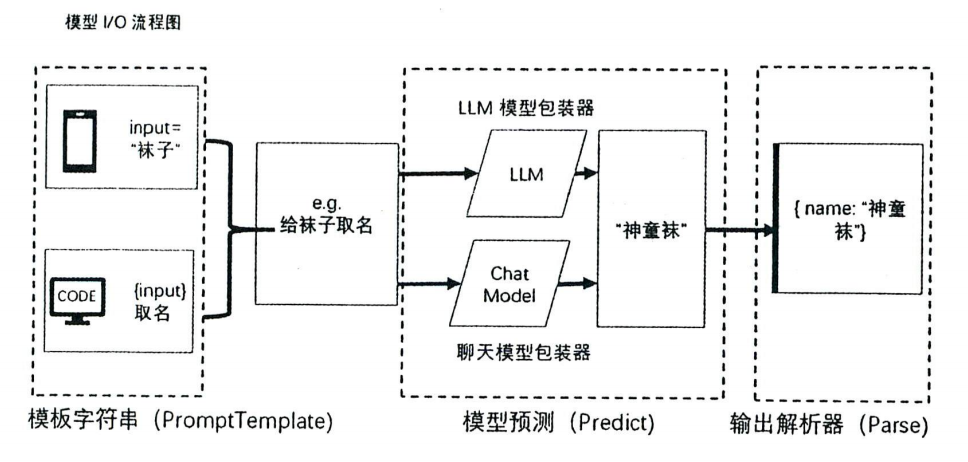
模型包装器
LangChain 的模型包装器组件是基于各个模型平台的API协议进行开发的,主要提供了两种类型的包装器。一种是通用的 LLM 模型包装器,另一种是专门针对 Chat 类型 API 的 ChatModel(聊天模型包装器)。
-
LLM 模型包装器
LLM 模型包装器是一种专门用于与大语言模型文本补全类型 API 交互的组件。这种类型的大语言模型主要用于接收一个字符串作为输入,然后返回一个补全的字符串作为输出。比如,你可以输入一个英文句子的一部分,然后让模型生成句子的剩余部分。这种类型的模型非常适合用于自动写作、编写代码、生成创意内容等任务。
-
聊天模型包装器
聊天模型包装器是一种专门用于与大语言模型的 Chat 类型 API 交互的包装器组件。设计这类包装器主要是为了适配 GPT-4 等先进的聊天模型,这类模型非常适合用于构建能与人进行自然语言交流的多轮对话应用,比如客服机器人、语音助手等。它接收一系列的消息作为输入,并返回一个消息作为输出。
之所以要区分两种类型的模型包装器,主要是因为它们所处理的输出和输出是不同的,且所适用的场景也是不同的。在LangChain的发展迭代过程中,每个模块调用模型I/O功能都提供了 LLM 模型包装器和聊天模型包装器两种代码编写方式。
LLM 模型包装器
如果你使用的是 LangChain(或 langchain_community)的 llms 模块导出的对象,则这些对象是 LLM 模型包装器,主要用于处理自由形式的文本。输入的是一段或多段自由形式文本,输出的则是模型生成的新文本。这些输出文本可能是对输入文本的回答、延续或其他形式的响应。
1
2
3
4
5
6
7
from langchain_community.llms import Tongyi
tongyi_llm = Tongyi(
    model="qwen-max",
)
input_text = "用50个字左右阐述,生命的意义在于"
tongyi_llm.invoke(input_text)
# output:'生命的意义在于追求个人的价值实现,体验世界的美好,同时为社会做出贡献,促进人与自然和谐共生。'
聊天模型包装器
如果你使用的是 LangChain(或 langchain_community)的 chat_models 模块导出的对象,则这些对象是专门用来处理对话消息的。输入的是一个对话消息列表,每条消息都由角色和内容组成。这样的输入给了大语言模型一定的上下文环境,可以提高输出的质量。输出的也是一个消息类型,这些消息是对连续对话内容的响应。
1
2
3
4
5
6
7
8
9
10
11
from langchain_community.chat_models import ChatTongyi
from langchain_core.messages import SystemMessage, HumanMessage, AIMessage
tongyi_chat = ChatTongyi(
    model="qwen-max",
)
input_message = [
    SystemMessage(content="你是一个富有哲思的哲学家"),
    HumanMessage(content="用50个字左右阐述,生命的意义是什么?"),
]
tongyi_chat.invoke(input_message)
# output:AIMessage(content='生命的意义在于探索与体验,于个人成长中寻找快乐与价值,同时在有限的时间里为世界留下积极的影响。', additional_kwargs={}, response_metadata={'model_name': 'qwen-max', 'finish_reason': 'stop', 'request_id': '93bd3f8e-09af-9dd9-81e9-53ba0c6e6e3c', 'token_usage': {'input_tokens': 33, 'output_tokens': 26, 'prompt_tokens_details': {'cached_tokens': 0}, 'total_tokens': 59}}, id='run-d6e60f56-eb25-48a6-b300-933ed1c2df7e-0')
提示词模板
提示词模板是一种可复制、可重用的生成提示词的工具,是用于生成提示词的模板字符串,其中包含占位符,这些占位符可以在运行时被动态替换成实际终端用户输入的值,其中可以插入变量、表达式或函数的结果。
提示词模板中可能包含(不是必须包含)以下3个元素。
- 明确的指令:这些指令可以指导大语言模型理解用户的需求,并按照特定的方式进行回应
- 少量示例:这些示例可以帮助大语言模型更好地理解任务,并生成更准确的响应
- 用户输人:用户的输人可以直接引导大语言模型生成特定的答案
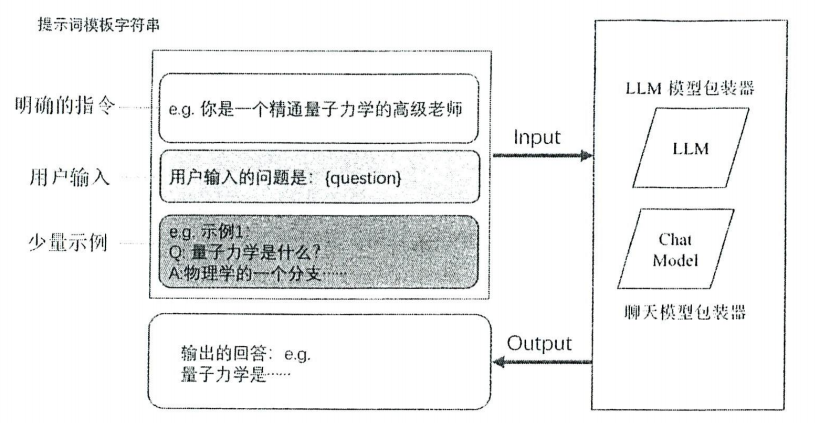
基础的提示词模板
PromptTemplate 包装器
PromptTemplate 是 LangChain 提示词组件中最核心的类,用于构造提示词。它的主要作用是将用户输入和内部定义的关键参数结合,生成一个完整的提示词。这个类被实例化为对象后,可以在 LangChain 的各个链组件中被调用。
1
2
3
4
5
6
7
8
9
10
11
12
13
14
15
16
from langchain.prompts import PromptTemplate

template = """
You are an expert data scientist with an expertise in building deep learning models.
Explain the concept of {concept} in a couple of lines.
"""

# Method1: Create a prompt with the template and input variables
prompt = PromptTemplate(template=template, input_variables=["concept"])

# Method2: Create a prompt with the template
prompt = PromptTemplate.from_template(template)

# Generate the final prompt
final_prompt = prompt.format(concept="gradient boosting")
#output: '\nYou are an expert data scientist with an expertise in building deep learning models.\nExplain the concept of gradient boosting in a couple of lines.\n'
-
prompt.format和prompt.format_prompt在 LangChain 中,
prompt.format和prompt.format_prompt是两种不同的方法,用于处理提示词模板的格式化。它们的主要区别在于返回的结果类型和用途。prompt.format是一个通用的字符串格式化方法,用于将动态变量插入到模板中并生成一个字符串结果。prompt.format_prompt是一个更高级的方法,用于将动态变量插入到模板中并生成一个PromptValue对象,可以进一步处理或传递给其他 LangChain 组件(如链或 Agent)
ChatPromptTemplate 包装器
ChatPromptTemplate包装器与PromptTemplate包装器不同。
ChatPromptTemplate包装器构造的提示词是消息列表,PromptTemplate包装器构造的提示词是一条消息ChatPromptTemplate包装器支持输出Message对象,PromptTemplate包装器输出字符串
LangChain提供了内置的聊天提示词模板(ChatPromptTemplate)和角色消息提示词模板。角色消息提示词模板包括 AIMessagePromptTemplate、SystemMessagePromptTemplate 和 HumanMessagePromptTemplate这3种。ChatPromptTemplate提示词模板可以有上述的三种角色消息提示词模板组成。
1
2
3
4
5
6
7
8
9
10
11
12
13
14
15
16
17
18
19
from langchain.prompts import (
    ChatPromptTemplate,
    PromptTemplate,
    SystemMessagePromptTemplate,
    HumanMessagePromptTemplate,
    AIMessagePromptTemplate
)
# Create a system message template
system_template = "You are a data scientist with expertise in building deep learning models."
system_message_template = SystemMessagePromptTemplate.from_template(system_template)
# Create a human message template
human_template = "Explain the concept of {concept} in a couple of lines."
human_message_template = HumanMessagePromptTemplate.from_template(human_template)
# Create a chat prompt template
chat_prompt = ChatPromptTemplate.from_messages(
    [system_message_template, human_message_template]
)
final_chat_prompt = chat_prompt.format_prompt(concept="gradient boosting")
# output: ChatPromptValue(messages=[SystemMessage(content='You are a data scientist with expertise in building deep learning models.', additional_kwargs={}, response_metadata={}), HumanMessage(content='Explain the concept of gradient boosting in a couple of lines.', additional_kwargs={}, response_metadata={})])
ChatPromptValue对象中有to_string方法和to_messages方法。
1
2
3
4
5
6
print(final_chat_prompt.to_messages())
# [SystemMessage(content='You are a data scientist with expertise in building deep learning models.', additional_kwargs={}, response_metadata={}), HumanMessage(content='Explain the concept of gradient boosting in a couple of lines.', additional_kwargs={}, response_metadata={})]

print(final_chat_prompt.to_string())
# System: You are a data scientist with expertise in building deep learning models.
# Human: Explain the concept of gradient boosting in a couple of lines.
少样本提示词模板
在 LangChain 中,少样本提示词模板(Few-Shot Prompt Template) 是一种特殊的提示词模板,用于在提示词中提供少量的示例输入和输出,帮助语言模型更好地理解任务的目标和格式。这种方法通常用于指导模型生成更符合预期的结果,尤其是在任务较为复杂或需要特定格式时。
构建少样本提示词模板时,需要明确以下几点:
- 任务描述:清晰地描述任务的目标和要求。
- 示例输入和输出:提供少量的示例,展示输入和对应的输出。
- 用户输入:在提示词中预留位置,用于插入用户的实际输入。
假设我们需要一个翻译任务的少样本提示词模板,将英文翻译成中文。
1
2
3
4
5
6
7
8
9
10
11
12
13
14
15
16
17
18
19
20
21
22
23
24
25
26
27
28
29
30
31
32
33
from langchain.prompts import FewShotPromptTemplate, PromptTemplate

# 定义任务描述
task_description = """
You are a professional translator. Please translate the following text from English to Chinese.
"""

# 定义示例输入和输出
examples = [
    {"input": "Hello, how are you?", "output": "你好,你好吗?"},
    {"input": "I love programming.", "output": "我喜欢编程。"},
]

# 定义示例模板
example_template = """
Input: {input}
Output: {output}
"""

# 创建示例提示词模板
example_prompt = PromptTemplate.from_template(example_template)

# 创建少样本提示词模板
few_shot_template = FewShotPromptTemplate(
    prefix=task_description,
    examples=examples,
    example_prompt=example_prompt,
    suffix="Input: {text}",
    input_variables=["text"],
)

chain = few_shot_template | tongyi_llm
chain.invoke(input={"text":"What is the meaning of life?"})
示例选择器
实际应用开发中面临的情况常常很复杂,例如,可能需要将一篇新闻摘要作为示例加入提示词。更具挑战性的是,还可能需要在提示词中加入大量的历史聊天记录或从外部知识库获取的数据。然而,大型语言模型可以处理的字数是有限的。如果提供的每个示例都是一篇新闻摘要,那么很可能会超过模型能够处理的字数上限。
为了解决这个问题,LangChain 在 FewShotPromptTemplate 类上设计了示例选择器(ExampleSelector)参数。示例选择器的作用是在传递给模型的示例中进行选择,以确保示例的数量和内容长度不会超过模型的处理能力。这样,即使有大量的示例,模型也能够有效地处理提示词,而不会因为示例过多或内容过长而无法处理。
LangChain 中提供了多种示例选择器,分别实现了不同的选择策略。
-
基于长度的示例选择器(
LengthBasedExampleSelector):根据示例的长度来选择示例。这在担心提示词长度可能超过模型处理窗口长度时非常有用。对于较长的输入,它会选择较少的示例,而对于较短的输入,它会选择更多的示例。1 2 3 4 5
length_based_example_selector = LengthBasedExampleSelector( examples=examples, example_prompt=example_prompt, max_length=50, )
max_lenght:设置示例的最大长度
-
最大边际相关性选择器(
MaxMarginalRelevanceExampleSelector):根据示例与输入的相似度及示例之间的多样性来选择示例。通过找到与输入最相似(即嵌入向量的余弦相似度最大)的示例来迭代添加示例,同时对已选择的示例进行惩罚。1 2 3 4 5 6
max_marginal_relevance_example_selector = MaxMarginalRelevanceExampleSelector.from_examples( examples=examples, embeddings=embeddings, vectorstore_cls=vectorstore, k=3, )
embeddings:需要传入一个文本嵌入模型vectorstore_cls:需要传入一个存储文本嵌入和相似性搜索的 vectorstorek:选择三个示例
-
基于
n-gram重叠度的选择器(NGramOverlapExampleSelector):根据示例与输入的n-gram重叠度来选择和排序示例。n-gram重叠度是一个介于0.0和1.0之间的浮点数。该选择器还允许设置一个阈值,重叠度低于或等于阈值的示例将被剔除。1 2 3 4 5
ngram_overlap_example_selector = NGramOverlapExampleSelector( examples=examples, example_prompt=example_prompt, threshold=-1, )
threshold:设置重叠度
-
基于相似度的选择器(
SemanticSimilarityExampleSelector):根据示例与输入的相似度来选择示例,通过找到与输入最相似(即嵌入向量的余弦相似度最大)的示例来实现。1 2 3 4 5 6
semantic_similarity_example_selector = SemanticSimilarityExampleSelector.from_examples( examples=examples, embeddings=embeddings, vectorstore_cls=vectorstore, k=3, )embeddings:需要传入一个文本嵌入模型vectorstore_cls:需要传入一个存储文本嵌入和相似性搜索的 vectorstorek:选择三个示例
应该注意的是,每一种示例选择器都可以通过函数方式来实例化,或者使用类方法
from_examples来实例化。比如MaxMarginalRelevanceExampleSelector类使用类方法from_examples来实例化,而LengthBasedExampleSelector类则使用函数方式实例化。
1
2
3
4
5
6
7
8
9
10
11
12
13
14
15
16
17
18
19
20
21
22
23
24
25
26
27
28
29
30
31
32
33
34
35
36
37
38
39
40
41
42
43
44
45
46
47
48
49
50
51
52
53
54
55
56
57
58
59
60
61
62
63
64
65
66
67
68
69
70
71
72
73
74
75
76
77
78
79
80
81
82
83
84
85
86
87
88
89
90
91
92
93
94
95
from langchain_community.embeddings import DashScopeEmbeddings
embeddings = DashScopeEmbeddings(
    model="text-embedding-v1",
)

from langchain_community.vectorstores import Chroma
vectorstore = Chroma("langchain_store", embeddings)

from langchain.prompts import FewShotPromptTemplate, PromptTemplate
from langchain.prompts.example_selector import (
    LengthBasedExampleSelector,
    MaxMarginalRelevanceExampleSelector,
    NGramOverlapExampleSelector,
    SemanticSimilarityExampleSelector
)

# 定义任务描述
task_description = """
You are a professional translator. Please translate the following text from English to Chinese.
"""

# 定义示例输入和输出
examples = [
    {"input": "Hello, how are you?", "output": "你好,你好吗?"},
    {"input": "I love programming.", "output": "我喜欢编程。"},
    {"input": "What is the meaning of life?", "output": "生命的意义是什么?"},
    {"input": "I am a professional translator.", "output": "我是一名专业的翻译。"},
    {"input": "I am a data scientist.", "output": "我是一名数据科学家。"},
    {"input": "I am a software engineer.", "output": "我是一名软件工程师。"},
    {"input": "I am a machine learning engineer.", "output": "我是一名机器学习工程师。"},
    {"input": "I am a deep learning engineer.", "output": "我是一名深度学习工程师。"},
    {"input": "I am a computer vision engineer.", "output": "我是一名计算机视觉工程师。"},
    {"input": "I am a natural language processing engineer.", "output": "我是一名自然语言处理工程师。"},
    {"input": "I am a computer scientist.", "output": "我是一名计算机科学家。"},
    {"input": "I am a software developer.", "output": "我是一名软件开发者。"},
    {"input": "I am a machine learning researcher.", "output": "我是一名机器学习研究员。"},
    {"input": "I am a deep learning researcher.", "output": "我是一名深度学习研究员。"},
    {"input": "I am a computer vision researcher.", "output": "我是一名计算机视觉研究员。"},
    {"input": "I am a natural language processing researcher.", "output": "我是一名自然语言处理研究员。"},
    {"input": "I am a computer science researcher.", "output": "我是一名计算机科学研究员。"},
    {"input": "I am a software development engineer.", "output": "我是一名软件开发工程师。"},
    {"input": "I am a machine learning development engineer.", "output": "我是一名机器学习开发工程师。"},
    {"input": "I am a deep learning development engineer.", "output": "我是一名深度学习开发工程师。"},
    {"input": "I am a computer vision development engineer.", "output": "我是一名计算机视觉开发工程师。"},
    {"input": "I am a natural language processing development engineer.", "output": "我是一名自然语言处理开发工程师。"},
    {"input": "I am a computer science development engineer.", "output": "我是一名计算机科学开发工程师。"},
    {"input": "I am a software development researcher.", "output": "我是一名软件开发研究员。"},
    {"input": "I am a machine learning development researcher.", "output": "我是一名机器学习开发研究员。"},
]

# 定义示例模板
example_template = """
Input: {input}
Output: {output}
"""

# 创建示例提示词模板
example_prompt = PromptTemplate.from_template(example_template)

# 创建示例选择器
length_based_example_selector = LengthBasedExampleSelector(
    examples=examples,
    example_prompt=example_prompt,
    max_length=50,
)
max_marginal_relevance_example_selector = MaxMarginalRelevanceExampleSelector.from_examples(
    examples=examples,
    embeddings=embeddings,
    vectorstore_cls=vectorstore,
    k=3,
)
ngram_overlap_example_selector = NGramOverlapExampleSelector(
    examples=examples,
    example_prompt=example_prompt,
    threshold=-1,
)
semantic_similarity_example_selector = SemanticSimilarityExampleSelector.from_examples(
    examples=examples,
    embeddings=embeddings,
    vectorstore_cls=vectorstore,
    k=3,
)


# 创建少样本提示词模板
few_shot_template = FewShotPromptTemplate(
    prefix=task_description,
    example_selector=semantic_similarity_example_selector,
    example_prompt=example_prompt,
    suffix="Input: {text}",
    input_variables=["text"],
)

chain = few_shot_template | tongyi_llm
chain.invoke(input={"text":"I am junior student of Shanghai Jiao Tong University."})
多功能提示词模板
LangChain 提供了一套默认的提示词模板,可以生成适用于各种任务的提示词,但是可能会出现默认提示词模板无法满足需求的情况。例如,你可能需要创建一个带有特定动态指令的提示词模板。在这种情况下,LangChain提供了很多不同功能的提示词模板,支持创建复杂结构的提示词模板。多功能提示词模板包括Partial提示词模板、PipelinePrompt组合模板、序列化模板、组合特征库和验证模板。
-
Partial提示词模板
有时你可能会面临一个复杂的配置或构建过程,其中某些参数在早期已知,而其他参数在后续步骤中才会知道。使用Partial提示词模板可以帮助你逐步构建最终的提示词模板。Partial提示词模板提供了灵活的方式来处理动态变量,支持部分填充提示词模板。
1
2
3
4
5
6
7
8
9
10
11
12
13
14
15
16
17
18
19
20
21
22
23
24
25
26
27
28
29
30
31
32
33
34
35
from datetime import datetime
from langchain.prompts import PromptTemplate

# 定义一个函数,返回当前日期
def _get_datetime():
    now = datetime.now()
    return now.strftime("%m/%d/%Y, %H:%M:%S")

############################################
# Method 1
############################################
# 创建一个完整的提示词模板
prompt = PromptTemplate(
    template="Tell me a {adjective} joke about the day {date}",
    input_variables=["adjective", "date"]
)

# 使用 partial 方法部分填充模板
partial_prompt = prompt.partial(date=_get_datetime())

# 完全填充模板并打印结果
print(partial_prompt.format(adjective="funny"))

############################################
# Method 2
############################################
# 创建一个完整的提示词模板
prompt = PromptTemplate(
    template="Tell me a {adjective} joke about the day {date}",
    input_variables=["adjective", "date"],
    partials_variables={"date": _get_datetime}
)

# 完全填充模板并打印结果
print(partial_prompt.format(adjective="funny"))
-
PipelinePrompt组合模板
在 LangChain 中,
PipelinePromptTemplate是一个用于构建复杂提示词管道的工具。它允许你将多个提示词模板组合在一起,形成一个完整的提示词管道。这种方式在处理复杂的任务时非常有用,例如需要多个步骤来完成的任务。1 2 3 4 5 6 7 8 9 10 11 12 13 14 15 16 17 18 19 20 21 22 23 24 25 26 27 28 29 30 31 32 33 34 35 36 37 38 39 40
from langchain.prompts import PromptTemplate, PipelinePromptTemplate # 定义每个步骤的提示词模板 step1_template = "You are a helpful assistant. Your task is to {task}." step1_prompt = PromptTemplate.from_template(step1_template) step2_template = "Based on the previous result, {additional_info}." step2_prompt = PromptTemplate.from_template(step2_template) step3_template = "Now, considering the above, {final_task}." step3_prompt = PromptTemplate.from_template(step3_template) # 创建管道提示词模板 pipeline_prompt = PipelinePromptTemplate( final_prompt=PromptTemplate.from_template( "{step1}\n{step2}\n{step3}\nFinal input: {final_input}" ), pipeline_prompts=[ ("step1", step1_prompt), ("step2", step2_prompt), ("step3", step3_prompt) ] ) # 定义输入 inputs = { "task": "translate the following text from English to Chinese", "additional_info": "Please ensure the translation is accurate and natural.", "final_task": "Provide a brief summary of the translation.", "final_input": "What is the meaning of life?" } # 生成完整的提示词 final_prompt = pipeline_prompt.format(**inputs) print(final_prompt) # output: # You are a helpful assistant. Your task is to translate the following text from English to Chinese. # Based on the previous result, Please ensure the translation is accurate and natural.. # Now, considering the above, Provide a brief summary of the translation.. # Final input: What is the meaning of life?
-
序列化模板
LangChain 支持加载 JSON 和 YAML 格式的提示词模板,用于序列化和反序列化提示词信息。你可以将应用程序的提示词模板保存到JSON 或 YAML 文件中(序列化),或从这些文件中加载提示词模板(反序列化)。序列化模板功能可以让开发者对提示词模板进行共享、存储和版本控制。
1
2
3
4
5
6
7
8
9
10
11
12
13
14
15
16
from langchain_core.load import dumps, loads
from langchain.prompts import PromptTemplate

# 定义一个提示词模板
prompt_template = PromptTemplate(
    template="You are a helpful assistant. Your task is to {task}.",
    input_variables=["task"]
)

# 将提示词模板序列化为 json 字典
serialized_prompt = dumps(prompt_template, pretty=True)
print(f"Serialized prompt: {serialized_prompt}")

# 从 json字典 反序列化为提示词模板
deserialized_prompt = loads(serialized_prompt)
print(f"Deserialized prompt: {deserialized_prompt}")